


CurbSmart Parent
3.120.00 Reviews
App Specs
- Version
- 4.2.1635
- Updated On
- License
- Free
- Downloads
- 10,000+
- Developer
- NutriLink Technologies
- Categories
- Parenting
- Platform
- Android
Screenshots

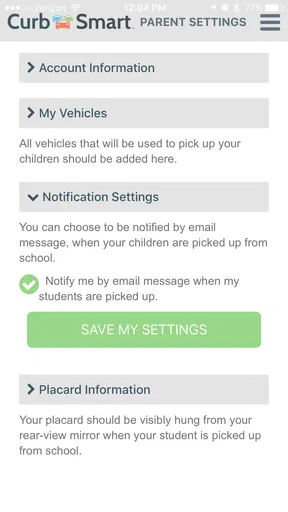
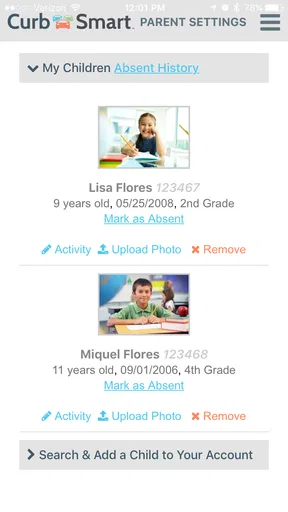
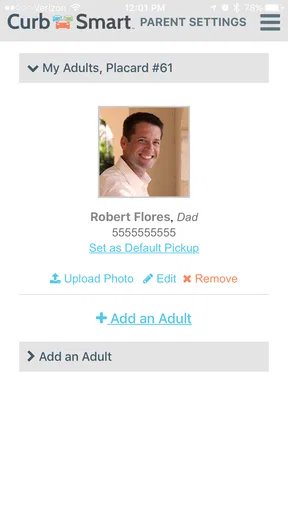
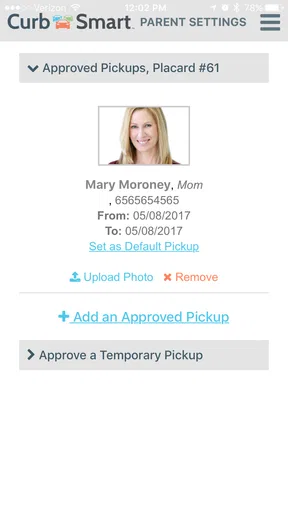
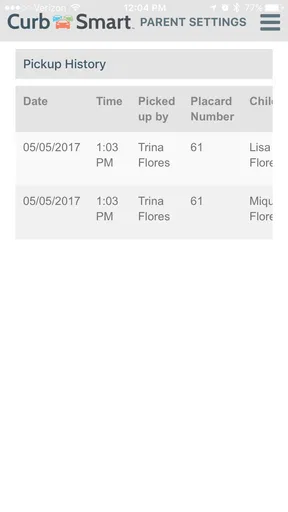
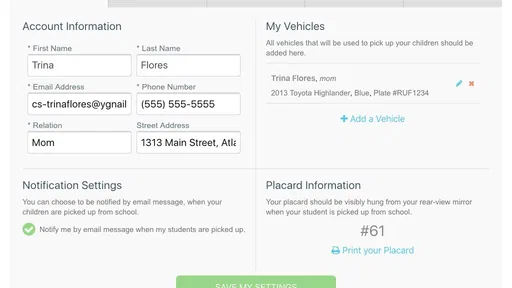
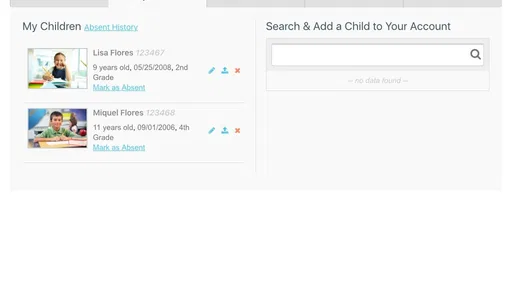
 Analysis by AppCompare
School pickup sounds simple until the final bell rings and several adults are trying to coordinate the same child at once. A parent may be stuck in traffic, another approved adult may be collecting the child, and the school needs a clear way to connect the right student with the right vehicle. CurbSmart Parent is built for that narrow but stressful moment: it is a parenting app from NutriLink Technologies focused on after-school car pickup.
My impression is that this is not an all-purpose family organizer or a replacement for messaging apps. Its value depends on whether your school or pickup program uses the same system. When it fits the school’s process, it can give the pickup routine a more defined shape. When it does not, the app has little practical value on its own. That distinction is the most important thing to understand before installing it.
From a pickup problem to a clearer routine
The starting condition is familiar. A child is ready to leave school, but the adult responsible for collection may change during the day. Families often handle this with handwritten notes, phone calls, texts, or a teacher trying to remember several last-minute instructions. Those methods can work, yet each one creates room for confusion at the curb.
CurbSmart Parent approaches the problem as a dedicated after-school pickup app. Rather than asking a parent to explain the entire situation through a text message, it places the family’s pickup activity inside a school-oriented workflow. That focus makes it more relevant than a general calendar when the main challenge is not remembering an appointment, but communicating a handoff at dismissal.
I would think of the app as one part of a chain. The parent supplies or confirms the pickup information, the school’s process uses it, and the staff member managing dismissal acts on the result. The app is therefore most useful when everyone involved treats it as part of the same routine. It cannot solve a disconnected process by itself.
The app is free, which removes the most obvious barrier for families deciding whether to try it. It is listed for everyone and belongs to the parenting category, so its intended audience is broad rather than limited to a specialist group. The current version is 4.2.1635, and the app runs on devices using Android 5.1 or later. That older minimum requirement is helpful for families using an older phone, although day-to-day reliability will still depend on the device and the school’s own setup.
What I would check before relying on it
Before making CurbSmart Parent part of my daily pickup routine, I would first confirm that the child’s school or pickup program expects parents to use it. This is not just a convenience check. A school may have a particular procedure for authorized adults, vehicle identification, dismissal changes, and late arrivals. If the school does not recognize the app, using it independently may create an extra step instead of removing one.
Worth Reading Before You Choose

EA SPORTS FC Mobile 26 Is a Bigger Football Game, but It Takes Time

Flipboard Shows What News Apps Must Do Beyond the Feed

Switching to Android Auto Means Rethinking Your Driving Routine

Google Calendar Makes a Crowded Week Easier to Manage

Ludo King Makes the Most of the Minutes Between Plans

Baby Panda World Brings Quick Play to Modern Phones, but Its Game Library Feels Busy
I would also clarify the school’s cutoff for changes. A parent who changes the pickup plan while already approaching the campus may discover that staff have already finalized their dismissal list. The app may be useful for communicating the change, but the school’s operating rules still control what happens at the curb. My practical advice is to treat the app as a communication aid, not as permission to bypass the school’s established safety process.
Another sensible preparation step is deciding who in the family will be responsible for updates. If one parent changes the plan in one place, another parent sends a separate text, and a grandparent arrives with different information, the technology has not actually simplified the handoff. A single household routine is more valuable than repeatedly entering competing instructions.
Following the pickup flow from home to the curb
I’d use this section to look at the practical rhythm behind the handoff, especially how an early plan can prevent a rushed change from becoming a curbside puzzle. I’ll also focus on a useful habit for shared-care households: deciding who owns the final update, so the school and the arriving adult are working from the same version of the plan.
Step one: prepare the day’s plan
The useful workflow begins before dismissal. I would start by deciding who is collecting the child and whether that plan is different from the normal arrangement. This is where a dedicated pickup tool has an advantage over a casual text thread: the information is intended for a specific school activity rather than buried among unrelated family messages.
For a normal day, the parent’s task should be straightforward: open the app, review the pickup arrangement, and make sure the information reflects the plan that the school should follow. For an unusual day, the important habit is to make the change early and then verify that the correct adult understands it. The app can support the record, but it does not remove the need for a quick human check when the change is important.
A realistic example would be a parent who normally collects a child after work but has an appointment one afternoon. Instead of leaving the child’s teacher to interpret a hurried note, the parent can use the school’s pickup workflow to identify the alternate arrangement. The second adult still needs to know where and when to arrive, and the school still needs to recognize that person. The app’s role is to make the parent’s part of that chain more deliberate.
Step two: make changes before the rush
The most useful non-obvious lesson is timing. A pickup app is easier to use when the parent updates the plan before leaving home, not while driving toward the school or while waiting in a line of cars. Last-minute edits are exactly when attention is divided and mistakes become more likely. I would build the update into the morning routine whenever I already know the afternoon will be different.
This also creates a practical backup habit. After changing the plan, I would keep the relevant confirmation or status visible until the handoff is complete, rather than assuming that tapping a button ends the responsibility. If the school uses a separate announcement channel, I would follow that as well. The safest workflow is not “the app said it was done,” but “the parent, alternate adult, and school are aligned.”
Step three: handle the adult handoff
Pickup systems are really about handoffs. The parent hands information to the school, the school connects that information to the student, and the child is handed to an approved adult. CurbSmart Parent is most valuable at the first link, where a family needs to communicate a planned collection clearly enough for school staff to act on it.
That means a parent should avoid treating the app like a private reminder. A reminder helps me remember what I intend to do; a pickup workflow is useful only when the responsible school personnel can use the information. If a grandparent, babysitter, or other family member is collecting the child, I would make sure that person knows the school’s arrival procedure and can answer any questions staff may have. The app does not replace identification or school judgment.
This is also where families with shared custody or several regular caregivers need extra care. A simple routine may be enough for one parent and one vehicle, but a more complicated arrangement benefits from a written household rule about who makes the final update. Otherwise, two adults may believe they are helping while actually creating conflicting instructions.
Step four: arrive with realistic expectations
At the curb, the app cannot control traffic, weather, staff availability, or the behavior of other families. I would therefore use it to support the expected pickup process rather than assuming it guarantees a fast collection. A parent who arrives late may still need to follow the school’s late-pickup procedure, even if the planned arrangement was entered correctly.
The same applies when someone other than the usual parent arrives. The adult should be prepared for the school to verify the arrangement through its own procedures. That may feel slower than simply waving a child toward a familiar car, but the extra friction is part of a responsible handoff. In my view, a pickup tool should be judged partly by whether it encourages clarity, not only by how quickly it feels.
Step five: confirm the outcome
The outcome is not merely that an entry was made in the app. The real outcome is that the child leaves with the intended adult and that the school’s staff do not have to resolve conflicting instructions at the last moment. Parents should still use common sense: if the expected adult cannot arrive, the plan changes again, or the child is not released as anticipated, direct contact with the school becomes more important than continuing to tap through the app.
This distinction helps set fair expectations. CurbSmart Parent can organize the parent’s contribution to the pickup chain, but the chain still depends on people following through. It is a coordination layer, not a substitute for communication, supervision, or the school’s own safety checks.
Where the experience is useful and where it becomes awkward
Here I’ll weigh the app’s focused approach against the familiar options families already use, then consider how school adoption and household routines affect its usefulness. The key distinction is whether it removes uncertainty from an established pickup process or simply creates one more place to check.
A focused alternative to texts and paper notes
Compared with ordinary text messages, a dedicated pickup app has a clearer purpose. Texts are quick, but they can be sent to the wrong person, buried in a busy conversation, or written without the context school staff need. A paper note can be easy for a child to carry, but it depends on reaching the right teacher and remaining legible. CurbSmart Parent is more structured around the pickup event itself, which is its main reason to exist.
Compared with a general family calendar, it is also more specific. A calendar can tell me that I am responsible for pickup, but it does not necessarily communicate a change through the school’s dismissal process. On the other hand, a calendar may be better for the broader family picture: sports, appointments, shared custody schedules, and recurring plans. I would not replace a family calendar with this app. I would use the pickup-focused tool only for the school handoff it is designed to support.
Compared with calling the school, the app may reduce interruptions for routine changes. Yet a phone call remains the better option when a situation is urgent, unusual, or unclear. If a child is sick, a caregiver is stranded, or the arrival plan has become confused, I would prioritize direct contact with the school rather than assuming an app update will be noticed immediately.
The trade-off of depending on a shared system
The biggest limitation is also the app’s defining condition: it works best when the school has adopted the same workflow. A parent cannot create a meaningful school-side handoff if staff are not looking for the information. This makes CurbSmart Parent less universally useful than a messaging app, even though a messaging app is less specialized.
There is also a learning curve for households that rarely change pickup plans. If the normal routine is always the same, opening a separate app may feel like unnecessary work. The value becomes clearer when several adults share responsibility or when the school’s dismissal line is busy enough that informal messages regularly cause confusion. Families with very simple arrangements may reasonably prefer the method their school already handles well.
Another point of friction is human attention. Parents may assume that recording a change is enough, while alternate caregivers may not know that the plan changed. I would make the app part of a two-step habit: update the pickup information and personally alert the person who must act on it. That extra message may seem redundant, but it protects against the most common failure in coordinated routines: one person has the latest information while another person is still following yesterday’s plan.
Who will benefit most
I see the strongest fit for families whose children use a structured car pickup line and whose school actively incorporates CurbSmart Parent into dismissal. It is particularly sensible when parents alternate responsibilities, approved caregivers change from day to day, or a child’s pickup arrangement is often different from the default.
It may also help a household that has outgrown handwritten notes but does not need a large family-management platform. The focused design can be an advantage: parents are dealing with one high-pressure task rather than sorting through a long list of unrelated features.
I would be more cautious about recommending it to a family whose school relies entirely on phone calls or paper authorization. In that situation, the app could become a second channel that parents must remember to maintain. I would also skip making it central to the routine if the child is usually collected through walking, a bus, or another process unrelated to car pickup. The closer your real problem is to the app’s intended workflow, the more likely it is to earn a place on your phone.
What the app’s public reception suggests
CurbSmart Parent has passed the ten-thousand-install mark, but its average rating is 3.1 from forty-eight ratings, with twenty written reviews. Those figures suggest a modest user base and a mixed experience rather than a universally smooth one. I would not interpret that as proof that the app is poor; pickup tools are unusually dependent on how a school implements them. Still, it is a reason to test the workflow with the school before depending on it during a complicated dismissal.
The app was released on May 9, 2017, and its current version is 4.2.1635. That combination tells me the product has had time to evolve, but I would still pay attention to how well it fits the school’s present-day routines. A technically updated app can remain frustrating if staff procedures, parent expectations, and caregiver communication are not aligned.
My recommendation after following the full handoff
After looking at the complete journey from a parent’s initial plan to the child’s arrival at the car, I see CurbSmart Parent as a specialized coordination tool rather than an essential parenting app for everyone. Its strongest contribution is giving the school pickup process a defined place for parent-side information. That can be genuinely helpful when several adults share collection duties and the school is already prepared to use the system.
My advice is to begin with a low-risk trial on an ordinary pickup day. Confirm that the school recognizes the app, enter the plan early, tell any alternate caregiver exactly what to do, and observe whether the handoff feels clearer. Do not make the first test a day when the child has an appointment, the parent is running late, or several changes are happening at once. A calm trial reveals whether the app reduces work or merely adds another step.
I would recommend it to parents who need a dedicated school pickup coordination routine and whose school supports NutriLink Technologies’ system. I would not recommend relying on it alone for urgent changes, unusual emergencies, or arrangements the school has not approved. In those cases, direct communication remains the safer choice.
The app is free and accessible to a wide age audience, but its real cost is attention: someone has to keep the information current, and every adult involved has to understand the handoff. If your family can make that small discipline part of the daily routine, CurbSmart Parent may bring welcome order to a hectic curb. If your school does not use it or your pickup arrangements are already simple, a direct school procedure or ordinary family communication may be the better fit.
My final view is cautiously positive. I like the narrow purpose because pickup confusion deserves a tool designed for pickup, not another overloaded family dashboard. At the same time, the app should be judged by the complete real-world outcome, not by whether entering a plan feels easy. The best result is a child released through a shared, understood process, and CurbSmart Parent can support that result when the school, parent, and caregiver all take part.
Pros
- Real-time pickup updates help families coordinate school transportation.
- Clear student check-in and release records improve pickup accountability.
- Useful notifications reduce uncertainty during busy dismissal periods.
- Supports safer handoffs by confirming authorized pickup information.
- Simple design makes essential transportation details easy to find.
Cons
- Requires participating schools or organizations to support CurbSmart.
- Notification timing may depend on staff updates and internet connectivity.
- Some features may be unavailable depending on the school’s configuration.
- Parents may need to keep location and notification permissions enabled.
- Account setup can be inconvenient when multiple children use different programs.
FAQs for CurbSmart Parent
What is CurbSmart Parent and who is it designed for?
CurbSmart Parent is a family transportation app designed to help parents manage and monitor scheduled student rides, pickups, and drop-offs. It is generally intended for families whose school, childcare provider, camp, or transportation service uses the CurbSmart platform. Before downloading, confirm that your organization supports CurbSmart, since the app may not provide useful features without an approved school or transportation account.
How does CurbSmart Parent help me track my child’s transportation?
The app can provide parents with ride-related updates, including scheduled trips, pickup or drop-off information, and notifications when a vehicle is approaching or a trip status changes. The exact tracking features depend on how the school or transportation provider has configured its CurbSmart service. Availability may also vary by route, driver, location permissions, and the organization’s communication policies.
Do I need an invitation or account from my child’s school or transportation provider?
In most cases, yes. CurbSmart Parent is connected to an organization-managed transportation system, so parents typically need an invitation, registration code, or account details supplied by the school, childcare center, or transportation provider. Downloading the app alone may not be enough to access schedules or tracking information. If you cannot sign in, contact the organization that arranged your child’s transportation.
Does CurbSmart Parent use my location, and is my child’s information protected?
The app may use location services and notifications to support transportation updates, estimated arrival information, and communication about rides. Because the service can involve sensitive details such as a child’s name, schedule, pickup location, and authorized contacts, parents should review the app’s privacy policy and the policies of their school or provider. Only enable permissions that are necessary for the features you intend to use.
What should I do if the ride information is incorrect or I do not receive notifications?
First, check that your account details, phone number, notification settings, and location permissions are correct, and make sure the app is updated. Mobile data or Wi-Fi problems can also delay alerts. If the schedule, pickup details, or child information remains incorrect, contact the school or transportation provider directly, because they usually control the underlying records and route configuration rather than the parent app itself.


